

Overview
A resolution is when the agent successfully fulfills the user’s intent. A user can interact with the agent, but still leave without getting what they came for.Purpose
Resolutions tell you whether your agent is addressing intents properly. View resolutions to measure agent effectiveness and identify which intents go unfulfilled.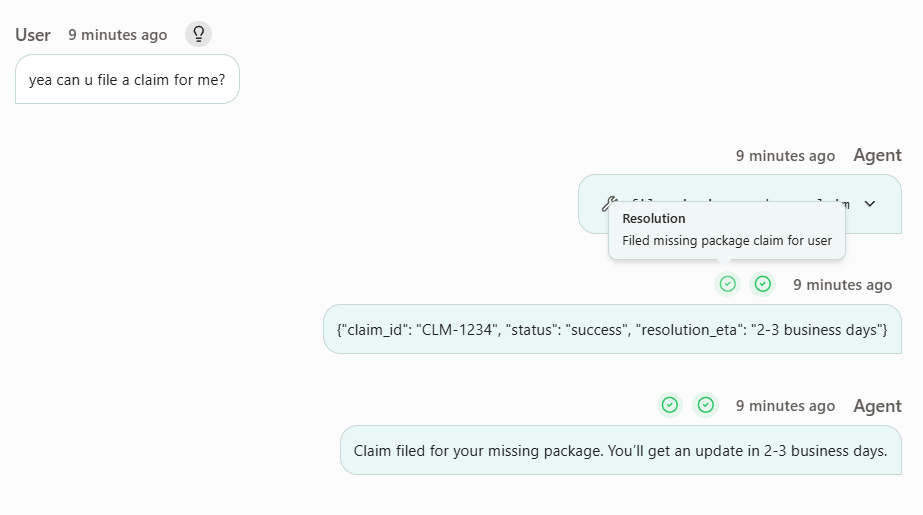
How it’s calculated
Every event you send to Voker is automatically evaluated against each open intent (i.e. unresolved intents) in the session. Voker marks each open intent as resolved when it’s properly fulfilled by looking at the agent’s response or tool results.If the user explicitly abandons the request, the intent will be marked as resolved.
Examples
| Intent | What happened | Is resolved |
|---|---|---|
Schedule appointment | Agent asks user which dates they are available | No |
Book flight to NYC | Agent calls booking tool, then confirms “Your flight has been booked.” | Yes |
Requests Refund | User says “Never mind, I don’t want the refund now” | Yes |
FAQ
Are resolutions purely detected through conversation?
Are resolutions purely detected through conversation?
Not necessarily. You can also send resolution events (e.g. add-to-cart, purchase, signup) from your frontend or backend to signal that an intent was fulfilled outside the chat. This is an advanced setup — contact the team to learn how.
Are resolutions customizable?
Are resolutions customizable?
Yes, but this is an advanced setup. Contact the team to tune how resolution is detected for your agent.
How do I use resolutions to optimize my agent?
How do I use resolutions to optimize my agent?
Resolution rate is the headline metric for whether your agent is delivering. Pair it with agent version tracking to measure the impact of every prompt, tool, or config change — the cookbook walks through using resolution rate (and cost per resolution) to confirm whether each version made the agent better or worse.