

Overview
A correction is when the user pushes back, rephrases, or clarifies because the agent got something wrong. It’s the clearest signal that the agent’s understanding or execution broke down.Purpose
Corrections pinpoint where the agent is failing in production such as wrong assumptions, hallucinations, missed details, or misinterpretations. Address frequent correction categories to drive prompt fixes, tool changes, and eval coverage for the failure patterns you didn’t think to test for.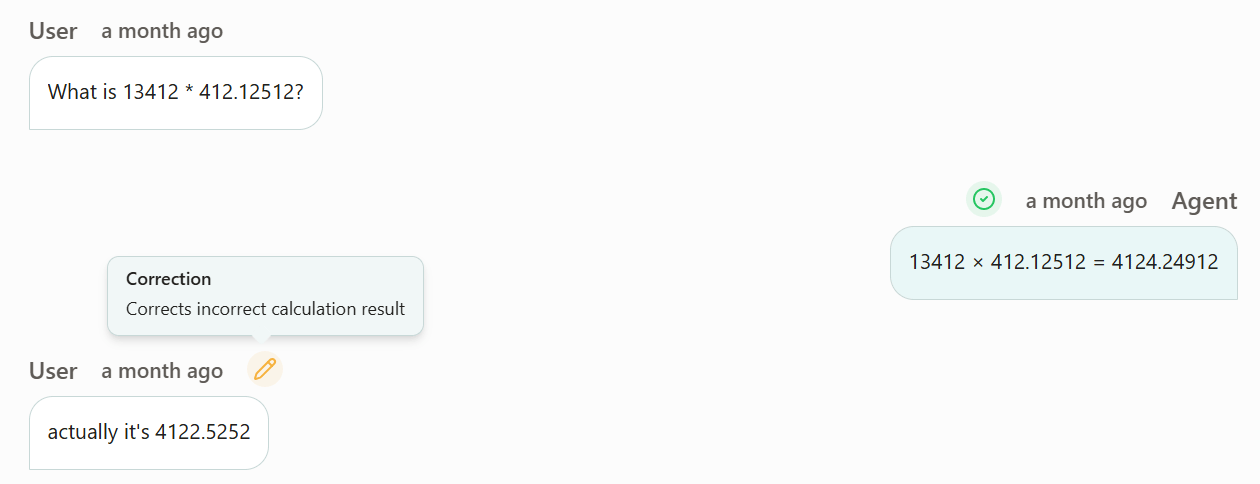
How it’s calculated
Every event you send to Voker is automatically annotated for corrections. Voker flags corrections as each distinct mistake the user fixes, challenges, or calls out. Each correction is categorized, allowing you to view common corrections across all sessions for each agent and person.Examples
| Agent | User | Correction | Category |
|---|---|---|---|
| ”You must checkout at 12/25/2026" | "My checkout date in November” | Corrects incorrect checkout date | Incorrect Date |
| ”Your total is $13.41 | ”what about tax?” | Points out missing tax from total | Missing Tax |
| ”The capital of France is Pears." | "it’s Paris…” | Corrects incorrect country capital | Incorrect Country Capital |
FAQ
Do corrections always mean the agent made a mistake?
Do corrections always mean the agent made a mistake?
No. Sometimes the user didn’t give enough information up front, or the user changes their mind on the direction of the intent.
Are all corrections caused by user frustration?
Are all corrections caused by user frustration?
No. Users making corrections can be frustrated, but they can also be neutral.
How do I use corrections to optimize my agent?
How do I use corrections to optimize my agent?
Look at the most frequent correction categories — those are your most repeatable failures. Use them to prioritize prompt changes, tool fixes, or model updates.