> ## Documentation Index
> Fetch the complete documentation index at: https://docs.voker.ai/llms.txt
> Use this file to discover all available pages before exploring further.
# Resolutions
> Understand if your agents are resolving end users' intents
## Overview
A **resolution** is when the agent successfully fulfills the user's intent. A user can interact with the agent, but still leave without getting what they came for.
## Purpose
Resolutions tell you whether your agent is addressing intents properly. View resolutions to measure agent effectiveness and identify which intents go unfulfilled.
 ## How it's calculated
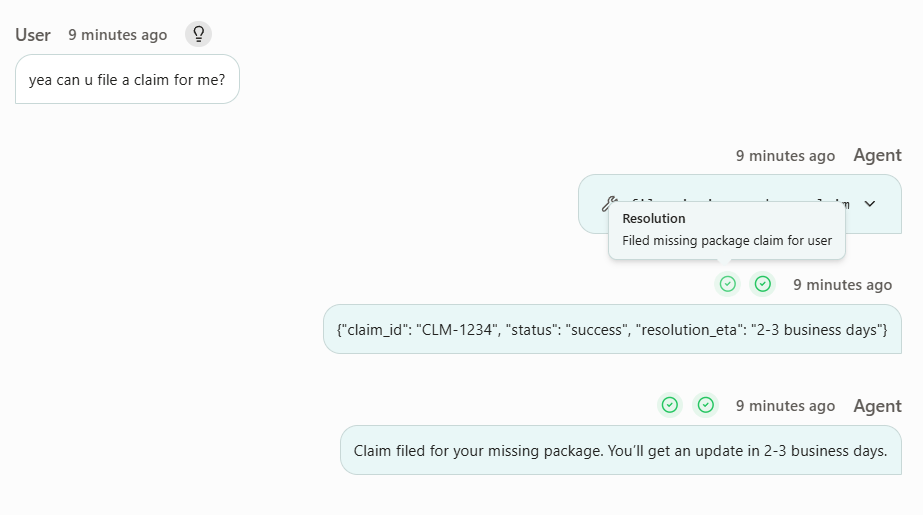
Every [event](/concepts/events) you send to Voker is automatically evaluated against each open intent (i.e. unresolved intents) in the session. Voker marks each open intent as resolved when it's properly fulfilled by looking at the agent's response or tool results.
If the user explicitly abandons the request, the intent will be marked as resolved.
## Examples
| Intent | What happened | Is resolved |
| ---------------------- | ---------------------------------------------------------------------- | ----------- |
| `Schedule appointment` | Agent asks user which dates they are available | `No` |
| `Book flight to NYC` | Agent calls booking tool, then confirms "Your flight has been booked." | `Yes` |
| `Requests Refund` | User says "Never mind, I don't want the refund now" | `Yes` |
## FAQ
Not necessarily. You can also send resolution events (e.g. add-to-cart, purchase, signup) from your frontend or backend to signal that an intent was fulfilled outside the chat. This is an advanced setup — [contact the team](https://discord.gg/A6hTXfvufu) to learn how.
Yes, but this is an advanced setup. [Contact the team](https://discord.gg/A6hTXfvufu) to tune how resolution is detected for your agent.
Resolution rate is the headline metric for whether your agent is delivering. Pair it with [agent version tracking](/cookbooks/agent-version-tracking) to measure the impact of every prompt, tool, or config change — the cookbook walks through using resolution rate (and cost per resolution) to confirm whether each version made the agent better or worse.
## How it's calculated
Every [event](/concepts/events) you send to Voker is automatically evaluated against each open intent (i.e. unresolved intents) in the session. Voker marks each open intent as resolved when it's properly fulfilled by looking at the agent's response or tool results.
If the user explicitly abandons the request, the intent will be marked as resolved.
## Examples
| Intent | What happened | Is resolved |
| ---------------------- | ---------------------------------------------------------------------- | ----------- |
| `Schedule appointment` | Agent asks user which dates they are available | `No` |
| `Book flight to NYC` | Agent calls booking tool, then confirms "Your flight has been booked." | `Yes` |
| `Requests Refund` | User says "Never mind, I don't want the refund now" | `Yes` |
## FAQ
Not necessarily. You can also send resolution events (e.g. add-to-cart, purchase, signup) from your frontend or backend to signal that an intent was fulfilled outside the chat. This is an advanced setup — [contact the team](https://discord.gg/A6hTXfvufu) to learn how.
Yes, but this is an advanced setup. [Contact the team](https://discord.gg/A6hTXfvufu) to tune how resolution is detected for your agent.
Resolution rate is the headline metric for whether your agent is delivering. Pair it with [agent version tracking](/cookbooks/agent-version-tracking) to measure the impact of every prompt, tool, or config change — the cookbook walks through using resolution rate (and cost per resolution) to confirm whether each version made the agent better or worse.